167 lines
4.1 KiB
Markdown
167 lines
4.1 KiB
Markdown
# Atomic theme
|
|
|
|
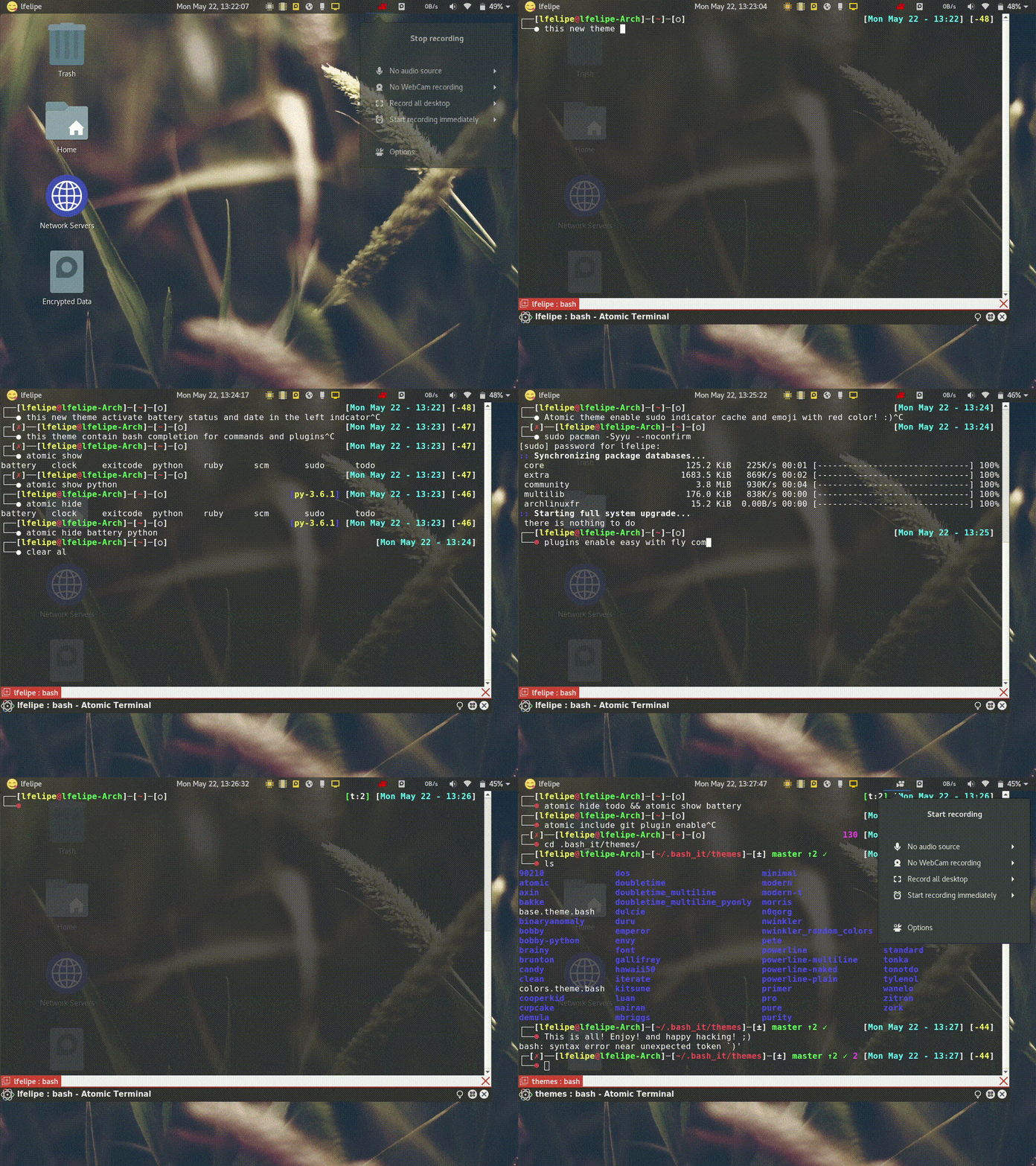
The Best ColorFull terminal prompt theme inspired by a number of themes and based on the theme of @MunifTanjim [`brainy`](../brainy/README.md).
|
|
|
|
Supported on all operating systems.
|
|
|
|
In constant maintenance and improvement
|
|
|
|
|
|
|
|
## Install Theme
|
|
|
|
### Manually
|
|
|
|
You can install the theme manually by following these steps:
|
|
Edit your modified config `~/.bashrc` file in order to customize Bash-it, set `BASH_IT_THEME` to the theme name `atomic`.
|
|
|
|
Examples:
|
|
|
|
```bash
|
|
# Use the "atomic" theme
|
|
export BASH_IT_THEME="atomic"
|
|
```
|
|
|
|
### Automatically via terminal
|
|
|
|
1. You can install the theme automatically using the `sed` command from your Linux or OSX Terminal.
|
|
2. On macOS, the ~/.bash_profile is used, not the ~/.bashrc.
|
|
3. For installation on windows you should use [`Git-Bash`](https://git-for-windows.github.io/) or make sure the terminal emulator you use (ej: cygwin, mintty, etc) has the `sed` command installed.
|
|
|
|
Command to execute For Windows and Linux:
|
|
```bash
|
|
# Set the "atomic" theme replacing the theme you are using of bash-it
|
|
sed -i 's/'"$BASH_IT_THEME"'/atomic/g' ~/.bashrc
|
|
```
|
|
Command to execute for macOS:
|
|
```bash
|
|
# Set the "atomic" theme replacing the theme you are using of bash-it
|
|
sed -i '' 's/'"$BASH_IT_THEME"'/atomic/g' ~/.bash_profile
|
|
```
|
|
|
|
## Features
|
|
|
|
### Prompt Segments
|
|
|
|
- Username & Hostname
|
|
- Current Directory
|
|
- SCM Information
|
|
- Battery Charge
|
|
- Clock
|
|
- [Todo.txt](https://github.com/ginatrapani/todo.txt-cli) status
|
|
- Ruby Environment
|
|
- Python Environment
|
|
- Exit Code
|
|
|
|
### Others
|
|
|
|
- Indicator for cached `sudo` credential
|
|
- Indicator for abort (ctrl + C) the current task and regain user control
|
|
- `atomic` command for showing/hiding various prompt segments on-the-fly
|
|
|
|
## Configuration
|
|
|
|
Various prompt segments can be shown/hidden or modified according to your choice. There are two ways for doing that:
|
|
|
|
1. On-the-fly using `atomic` command
|
|
2. Theme Environment Variables
|
|
|
|
### On-the-fly using `atomic` command
|
|
|
|
This theme provides a command for showing/hiding prompt segments.
|
|
|
|
`atomic show <segment>`
|
|
|
|
`atomic hide <segment>`
|
|
|
|
Tab-completion for this command is enabled by default.
|
|
|
|
Configuration specified by this command will only be applied to current and subsequent child shells.
|
|
|
|
### Theme Environment Variables
|
|
|
|
This is used for permanent settings that apply to all terminal sessions. You have to define the value of specific theme variables in your `bashrc` (or equivalent) file.
|
|
|
|
The name of the variables are listed below along with their default values.
|
|
|
|
#### User Information
|
|
|
|
Indicator for cached `sudo` credential (see `sudo` manpage for more information):
|
|
|
|
`THEME_SHOW_SUDO=true`
|
|
|
|
#### SCM Information
|
|
|
|
Information about SCM repository status:
|
|
|
|
`THEME_SHOW_SCM=true`
|
|
|
|
#### Ruby Environment
|
|
|
|
Ruby environment version information:
|
|
|
|
`THEME_SHOW_RUBY=false`
|
|
|
|
#### Python Environment
|
|
|
|
Python environment version information:
|
|
|
|
`THEME_SHOW_PYTHON=false`
|
|
|
|
#### ToDo.txt status
|
|
|
|
[Todo.txt](https://github.com/ginatrapani/todo.txt-cli) status:
|
|
|
|
`THEME_SHOW_TODO=false`
|
|
|
|
#### Clock
|
|
|
|
`THEME_SHOW_CLOCK=true`
|
|
|
|
`THEME_CLOCK_COLOR=$bold_cyan`
|
|
|
|
Format of the clock (see `date` manpage for more information):
|
|
|
|
`THEME_CLOCK_FORMAT="%H:%M:%S"`
|
|
|
|
#### Battery Charge
|
|
|
|
Battery charge percentage:
|
|
|
|
`THEME_SHOW_BATTERY=false`
|
|
|
|
#### Exit Code
|
|
|
|
Exit code of the last command:
|
|
|
|
`THEME_SHOW_EXITCODE=true`
|
|
|
|
## Prompt Segments Order
|
|
|
|
Currently available prompt segments are:
|
|
|
|
- battery
|
|
- char
|
|
- clock
|
|
- dir
|
|
- exitcode
|
|
- python
|
|
- ruby
|
|
- scm
|
|
- todo
|
|
- user_info
|
|
|
|
Three environment variables can be defined to rearrange the segments order. The default values are:
|
|
|
|
`___ATOMIC_TOP_LEFT="user_info dir scm"`
|
|
|
|
`___ATOMIC_TOP_RIGHT="exitcode python ruby todo clock battery"`
|
|
|
|
`___ATOMIC_BOTTOM="char"`
|
|
|
|
### Development by
|
|
|
|
Developer / Author: [Luis Felipe Sánchez](https://github.com/lfelipe1501)
|
|
|
|
This work is licensed under the Creative Commons Attribution 4.0 International License. To view a copy of this license, visit http://creativecommons.org/licenses/by/4.0/ or send a letter to Creative Commons, PO Box 1866, Mountain View, CA 94042, USA.
|